实践范例:分页列表
分页列表是共享同一处真相的四种状态:初次加载、已有内容的列表、「加载下一页」的
入口,以及终态的「没有更多结果」。UseInfiniteResource 在
Microsoft.UI.Reactor(Reactor)里持有全部四种状态 —— 下面的组件对 LoadState 做模式匹配并直接读取
Items;加载与错误都没有本地的 UseState。
原语
| 关注点 | API |
|---|---|
| 游标分页拉取 | UseInfiniteResource |
| 页负载 + 游标 | Page<TItem, TCursor> |
| 生命周期判别式 | LoadState.Loading / Idle / EndOfList / Error |
| 扁平的稀疏视图 | InfiniteResource.Items(null 表示尚未加载的槽位) |
| 手动翻页 | commits.FetchNext() / commits.Retry() |
数据 + 拉取器
// 本范例与 API 的具体形态无关:无论后端是 REST、gRPC,还是像这里这样的
// 进程内假实现,拉取器都返回 Page<TItem, TCursor>。
// 游标是服务端给回什么就是什么;null 表示列表结束。
record Commit(string Sha, string Message);

static class FakeApi
{
    private static readonly Commit[] All = Enumerable.Range(0, 23)
        .Select(i => new Commit($"sha-{i:000}", $"Refactor module {i}"))
        .ToArray();

    public static async Task<Page<Commit, string>> GetCommitsAsync(string? cursor, CancellationToken ct)
    {
        await Task.Delay(450, ct);              // simulate network latency
        const int pageSize = 5;
        int offset = cursor is null ? 0 : int.Parse(cursor);
        var slice = All.Skip(offset).Take(pageSize).ToArray();
        int next = offset + slice.Length;
        string? nextCursor = next >= All.Length ? null : next.ToString();
        return new Page<Commit, string>(slice, nextCursor, TotalCount: All.Length);
    }
}
拉取器唯一的契约是 (cursor, ct) -> Task<Page<TItem, TCursor>>。
游标对 Reactor 是不透明的 —— 你的服务端说什么就传回什么
(偏移量、不透明的延续字符串、记录 id)。NextCursor 为 null
就是表示列表结束的方式;这也是 LoadState
转为 EndOfList 的唯一途径。
一次 Hook 调用
// UseInfiniteResource 持有拉取生命周期:依赖变化时取消、
// 进行中页面的去重、扁平的稀疏 `Items` 列表(null = 未加载的槽位),
// 以及供 UI 做模式匹配的 `LoadState` 判别式。
var commits = UseInfiniteResource<Commit, string>(
    fetchPage: (cursor, ct) => FakeApi.GetCommitsAsync(cursor, ct),
    deps: new object[] { "commits" });
UseInfiniteResource 注册拉取器、持有取消令牌,
并能跨重渲染存活。deps 数组就是缓存键 —— 改变它
(例如某个筛选条件翻转时),Hook 会取消进行中的页面、丢弃
页表,并从第 0 页重新拉取。当你需要一份邻近的 UI 状态
(筛选、排序)时,参见 UseState —— 两者天然搭配,因为 setter 会触发
重渲染,而 deps 随后驱动重启。
从资源推导 UI 状态
// 该 Hook 暴露三个 UI 关心的可观察信号:
//   - LoadState  — Loading / Idle / EndOfList / Error
//   - Items      — 稀疏扁平列表(null 项表示进行中或未加载)
//   - HasMore    — 服务端报告 NextCursor 为 null 后为 false
// 下面的一切都由这些推导而来 —— 没有为「是否正在加载」
// 或「是否失败了」准备的本地 UseState;Hook 就是那处真相。
var loadedItems = commits.Items.OfType<Commit>().ToArray();
var isInitialLoad = commits.LoadState is LoadState.Loading && loadedItems.Length == 0;
var error = commits.LoadState as LoadState.Error;
var atEnd = commits.LoadState is LoadState.EndOfList;
var loadingMore = commits.LoadState is LoadState.Loading && loadedItems.Length > 0;
组件里没有 (loading, setLoading),也没有 (error, setError)。
LoadState 是判别式;Items.Count 是「是否已经加载到东西」的谓词。
每次渲染都本地推导这些东西没有问题 —— 工作是纯 C#,
并且协调器会跳过没有变化的槽位。
渲染四种状态
Element body;
if (isInitialLoad)
{
    body = TextBlock("Loading…").Opacity(0.6).Padding(20);
}
else if (error is not null && loadedItems.Length == 0)
{
    body = VStack(8,
        TextBlock($"Couldn't load commits: {error.Exception.Message}")
            .Foreground(Theme.SystemCritical),
        Button("Retry", () => commits.Retry())
    ).Padding(20);
}
else if (loadedItems.Length == 0)
{
    body = TextBlock("No commits yet.").Opacity(0.6).Padding(20);
}
else
{
    body = VStack(2,
        loadedItems.Select(c =>
            HStack(8,
                TextBlock(c.Sha).Opacity(0.5).Width(72),
                TextBlock(c.Message)
            ).Padding(6)
             .WithKey(c.Sha)
        ).ToArray()
    );
}

// 页脚就是「加载更多」的哨兵:还有下一页时是按钮,
// 服务端报告列表结束后是标签,逐页出错时是重试按钮。
Element footer = atEnd
    ? TextBlock("— end of list —").Opacity(0.5).Padding(12)
    : error is not null && loadedItems.Length > 0
        ? Button($"Retry — {error.Exception.Message}", () => commits.Retry())
            .AutomationName("Retry loading the next page")
            .Padding(8)
        : Button(
            loadingMore ? "Loading more…" : $"Load more ({commits.EstimatedRemaining} remaining)",
            () => commits.FetchNext()
          )
            .AutomationName(loadingMore ? "Loading more commits" : "Load more commits")
            .IsEnabled(!loadingMore)
            .Padding(8);

return VStack(0,
    Heading($"Commits ({commits.TotalCount ?? loadedItems.Length})").Padding(20),
    body,
    footer
).Width(400);
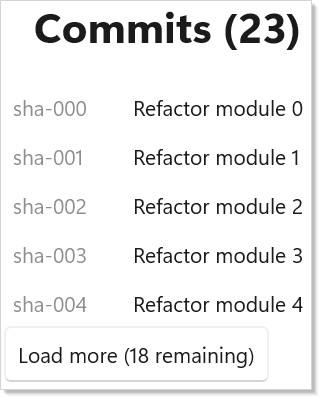
主体按三个谓词分支:初次加载(骨架)、首页出错且已加载条目为零(整屏重试),
或已有内容的列表。页脚就是那个哨兵 —— 还有页面时是 Button("Load more"),
一旦服务端报告 NextCursor == null 就换成「— end of list —」标签,
而首页加载成功、后续某页出错时则是逐页重试。已加载的条目能跨重渲染存活,
因为它们活在 Hook 的 Items 视图里,而不是本地状态中。
提示
不要动用 UseState 去记住页面。 该 Hook 的 Items 就是页存储。
把它镜像到本地列表等于复制状态 —— 而且那份本地副本会在下一次依赖变化重新拉取后
变陈旧。
游标分页是串行的;偏移量分页是并行的。 游标模式会
链式拉取,因为第 N 页的游标活在第 N-1 页里。如果你的
服务端说偏移量,就给
UseInfiniteResource 传入 cursorFromPageIndex 参数,让深度滚动时能并发拉取
页面。
在行数真正可观时升级为虚拟化控件。 按钮驱动的
「加载更多」适合约 5 到 200 行。一旦列表超过视口所能容纳的
页数,就改用虚拟化控件的
ItemAt(i) 驱动拉取(见 集合)—— 同一个 Hook
支撑这两种流程。
区分首页错误与后续页错误。 初次拉取失败应占用整个列表区域;
加载第 3 页失败则只应替换页脚按钮。本范例按
loadedItems.Length 分支来在两者间做选择。