速查表
Microsoft.UI.Reactor(Reactor)一览。每一行都链接到深入讲解该内容的页面。
最小可用应用
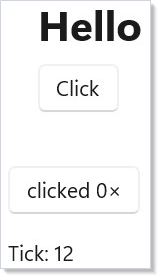
class HelloVignette : Component
{
    public override Element Render() =>
        VStack(8,
            Heading("Hello"),
            Button("Click", () => { })
        ).Padding(20);
}
三样东西:一句 using static Microsoft.UI.Reactor.Factories 导入、
一个 Component 子类,以及一次 ReactorApp.Run<App>(title, ...) 调用。
文档应用从 docs/_pipeline/apps/Directory.Build.props 继承
Reactor.DevtoolsSupport=true,好让 mur 能采集截图。
Hook
| Hook | 返回 | 何时使用 |
|---|---|---|
UseState<T>(initial) |
(T, Action<T>) |
驱动重渲染的本地状态。 |
UseReducer<T>(initial) |
(T, Action<Func<T,T>>) |
基于前值的函数式更新。 |
UseReducer<S,A>(reducer, initial) |
(S, Action<A>) |
Redux 风格的状态。 |
UseEffect(setup, deps?) |
void | 渲染后的副作用;重跑前执行清理。 |
UseMemo<T>(factory, deps) |
T |
跨渲染缓存昂贵的计算。 |
UseCallback(fn, deps) |
稳定的委托 | 记忆化回调的身份。 |
UseRef<T>(initial) |
Ref<T> |
不触发重渲染的可变值。 |
UseContext<T>(ctx) |
T |
读取上下文值。 |
UsePersisted<T>(key, initial, scope) |
(T, Action<T>) |
通过 LRU 缓存跨重新挂载存活。 |
UseColorScheme() |
ColorScheme |
响应式的应用级浅色/深色。强制颜色模式:UseHighContrast()。 |
UseResource(fetcher, cache, deps, opts?) |
AsyncValue<T> |
async-resources。 |
UseFocusTrap(isActive) |
FocusTrapHandle |
把 Tab 限制在某个子树内。 |
UseAnnounce() |
AnnounceHandle |
推送一条屏幕阅读器播报(通过 .Announce(string) 方法)。 |
UseElementRef<T>() |
ElementRef<T> |
引用已落实的元素,用于焦点、TeachingTip.Target、UIA 关系或 XYFocus。 |
UseDevtools() |
bool |
开发工具门控 —— 开发工具启用时为 true。 |
class StateVignette : Component
{
    public override Element Render()
    {
        var (count, setCount) = UseState(0);
        return Button($"clicked {count}×", () => setCount(count + 1))
            .AutomationName($"Increment counter; clicked {count} times");
    }
}
class EffectVignette : Component
{
    public override Element Render()
    {
        var (tick, incrementTick) = UseReducer(0, threadSafe: true);
        UseEffect(() =>
        {
            var timer = new System.Timers.Timer(1000);
            timer.Elapsed += (_, _) => incrementTick(t => t + 1);
            timer.Start();
            return () => timer.Dispose();
        }, []);
        return TextBlock($"Tick: {tick}");
    }
}
完整内容见 Hook。
常用工厂方法
| 工厂方法 | 说明 |
|---|---|
TextBlock(s) / Heading(s) / SubHeading(s) / Caption(s) |
只读文本。 |
Button(label, onClick) |
点击控件。 |
TextBox(value, set, placeholder?, header?) |
单行输入。 |
PasswordBox(pwd, set, placeholderText?) |
遮蔽输入。 |
NumberBox(value, set, header?) |
数值输入。 |
CheckBox(checked, set, label?) |
两态复选框。 |
ToggleSwitch(on, set, header?) |
两态开关。 |
Slider(value, min, max, set) |
数值范围。 |
ComboBox(items, index, set) |
下拉列表。 |
RadioButtons(items, index, set) |
单选按钮组。 |
VStack(spacing, ...children) / HStack(spacing, ...children) |
线性堆叠。 |
Grid(cols, rows, ...children) |
双轴布局。 |
ScrollView(child) |
滚动容器。 |
Border(child) |
边框 + 圆角包装。 |
Expander(header, content) |
可折叠分区。 |
ListView<T>(items, key, view) |
绑定列表。 |
VirtualList(count, render, ...) |
索引驱动的虚拟列表。 |
DataGrid<T>(source, columns, ...) |
数据系统表格。 |
Win2DCanvas(...) / Win2DAnimatedCanvas(...) |
来自 Microsoft.UI.Reactor.Advanced 的可选 Win2D 画布表面(导入 using static Microsoft.UI.Reactor.Advanced.Factories;)。 |
Empty() / Group(...children) / ForEach(items, render) |
元素树辅助方法。 |
Memo(ctx => ...) / RenderEachTime(ctx => ...) |
函数式组件。 |
Component<TComp>() |
挂载基于类的 组件。 |
完整内容见 控件。
修饰符链
| 分组 | 方法 |
|---|---|
| 尺寸 | .Width(n) .Height(n) .Size(w,h) |
| 间距 | .Margin(n) .Padding(n) .HAlign(...) .VAlign(...) .HorizontalContentAlignment(...) .VerticalContentAlignment(...) |
| 文本 | .FontSize(n) .Bold() .SemiBold() .Opacity(n) |
| 颜色 | .Background(token) .Foreground(token) .BorderBrush(token) .BorderThickness(...) .WithBorder(token, thickness?) |
| 形状 | .CornerRadius(n) |
| 行为 | .IsEnabled(bool) .IsVisible(bool) .IsHitTestVisible(bool) .ToolTip(s) .ToolTip(s, PlacementMode) .ToolTipPlacement(...) .ToolTipPlacementTarget(r) |
| 键控 | .WithKey(s) |
| Flex | .Flex(grow?, shrink?, basis?) |
| 主题 | .RequestedTheme(ElementTheme) .Backdrop(BackdropKind) |
| 过渡 | .OpacityTransition() .ScaleTransition() .TranslationTransition() |
| 合成器动画 | .Animate(Curve, prop?) .Transition(t, c?) .InteractionStates(b, c?) |
| 布局动画 | .LayoutAnimation() .SpringLayoutAnimation() .ConnectedAnimation(key) |
| 引用 | .Ref(r) .Target(r) .LabeledBy(r) .DescribedBy(...) .XYFocusRight(r) |
| 逃生通道 | .Set(ctrl => { /* raw WinUI */ }) |
应用入口 + 托管
| API | 用途 |
|---|---|
ReactorApp.Run<TComp>(title, width?, height?, fullScreen?, configure?) |
单窗口应用。 |
ReactorApp.OpenWindow(spec, root) |
由 WindowSpec 打开额外窗口。 |
ReactorHost / ReactorHostControl |
把 Reactor 嵌入 XAML / WinForms。 |
NavigationHost(nav, routeMap) |
多页导航。 |
DeepLinkMap<TRoute> |
URI 模式路由。 |
Command / Button(command) / .Command(cmd) |
命令。 |
IDataSource<T> / DataGrid<T> |
数据系统。 |
ApplicationPersistedScope.Default |
进程级持久化缓存。 |
主题色
| 令牌 | 含义 |
|---|---|
Theme.Accent / Theme.AccentSecondary / Theme.AccentText |
强调色填充 + 文本。 |
Theme.PrimaryText / Theme.SecondaryText / Theme.DisabledText |
文本层级。 |
Theme.CardBackground / Theme.SolidBackground / Theme.LayerFill |
表面。 |
Theme.ControlFill / Theme.ControlFillSecondary / Theme.ControlFillInputActive |
控件状态。 |
Theme.CardStroke / Theme.DividerStroke / Theme.ControlStroke |
边框。 |
Theme.SystemSuccess / Theme.SystemCaution / Theme.SystemCritical |
信号色。 |
Theme.Ref("CustomKey") |
应用自定义键的逃生通道。 |
完整令牌目录见 主题令牌。
模式一览
受控输入。 var (v, set) = UseState("") →
TextBox(v, set)。
带清理的副作用。 从副作用 lambda 返回一个清理 lambda; Reactor 会在下一次运行前(依赖变化时)以及卸载时调用它。
条件渲染。 cond ? Element1 : Empty() 在 cond 为 false 时把该元素
挡在元素树之外 —— 见
模态对话框范例。
带稳定键的列表。 ForEach(items, x => Card(x).WithKey(x.Id)),
好让协调器能移动行而不是重建行。
引用 prop。 var target = this.UseElementRef<FrameworkElement>() →
Button("Open", show).Ref(target) →
TeachingTip("Tip", target: target)。对于必须在晚挂载或
卸载之后依然存活的关系,请使用引用 prop,而不是
target.Current。
记忆化子树。 把昂贵的子元素包进 Memo(ctx => …);
函数式组件的缓存会让它跨父级重渲染存活。
异步工作期间禁用提交。 一个 submitting 布尔值
同时覆盖按钮的 .IsEnabled(...) 与转圈时的标签。
规则
五条规则覆盖了大多数分析器发现项(完整列表见 Reactor 的规则):
- Hook 放在
Render顶部,绝不放进循环或条件分支。 - Hook 返回的 setter 是稳定的;你可以放心地在 闭包里捕获它们。
- 渲染函数是纯的 —— 副作用放进
UseEffect。 - 对于任何可能重排的元素,列表都需要稳定的
.WithKey()。 - 主题感知的修饰符(
.Background、.Foreground、.WithBorder) 应当接受Theme.*令牌,而不是十六进制字面量。
提示
先扫一遍速查表,再跳转。 每一行都是一句话;深入讲解页 只差一次点击。不要试图从这一页学会 Reactor —— 请从 快速上手 与 组件 学起,把这张卡片当作回忆用的表面。
把修饰符表加入书签。 修饰符链是打字打到一半最容易忘的东西; 修饰符表是本页访问量最高的部分。
抄范例里的形态,而不是抄速查表。 范例是可以工作的组合; 速查表是目录。
后续阅读
- 快速上手 —— Hello world 走读。
- Hook —— 逐个 Hook 的深入讲解。
- 控件 —— 完整控件目录。
- 样式 —— 修饰符详解。
- Reactor 的规则 —— 带分析器代码的完整规则列表。