持久化
UsePersisted 让一个值在组件重新挂载之后依然存在 —— 用户离开导航、组件卸载、用户导航回来,被捕获的状态仍在。它是「跨标签切换保留用户输入的内容」或「在用户打开侧边窗格时记住列表里选中的行」这类需求的正确 Hook。它不是「写入磁盘以便值能在应用重启后幸存」的正确 Hook;后者需要在 UseEffect 里搭一座磁盘桥,下文会讲。
// UsePersisted with explicit Window scope. The text outlives a re-mount
// of the component (e.g. navigation away and back) but is dropped when
// the host window closes. Replace PersistedScope.Window with
// PersistedScope.Application for process-lifetime persistence.
class NotesEditor : Component
{
    public override Element Render()
    {
        var (text, setText) = UsePersisted(
            "notes/body",
            initialValue: "",
            scope: PersistedScope.Window);

        return VStack(8,
            SubHeading("Notes"),
            TextBox(text, setText, placeholderText: "Start typing…")
                .AutomationName("Notes body")
                .Width(380),
            TextBlock($"{text.Length} characters").Opacity(0.6)
        ).Padding(16);
    }
}
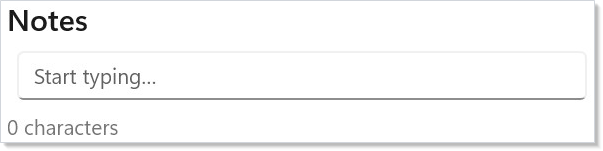
查找每次挂载只发生一次:该 Hook 在具名作用域中查找 "notes/body",若存在就返回缓存值(否则返回提供的 initialValue),并在每次状态更新时把最新值写回该作用域。当组件卸载、稍后重新挂载时,第二次挂载会找到存储的值并跳过默认值。
参考
| API | 返回 | 说明 |
|---|---|---|
UsePersisted<T>(key, initialValue) |
(T, Action<T>) |
默认使用 PersistedScope.Application。 |
UsePersisted<T>(key, initialValue, scope) |
(T, Action<T>) |
显式指定作用域 —— 新代码推荐这种。 |
PersistedScope.Window |
枚举值 | 绑定到宿主窗口;卸载时丢弃。 |
PersistedScope.Application |
枚举值 | 进程生命周期;跨窗口幸存。 |
IPersistedStateScope |
接口 | LRU 有界缓存;TryGet/Set/Remove。 |
ApplicationPersistedScope.Default |
静态 | 进程范围单例,4096 条目的 LRU。 |
ReactorWindow.PersistedScope |
属性 | PersistedScope.Window 解析到的逐窗口作用域。 |
该缓存仅在内存中。它由 LRU 限制(应用作用域默认 4096 条目),并注册了操作系统内存压力通知 —— 当宿主发出压力信号时,该作用域会收缩到容量的 25%。框架内部不做任何到磁盘的序列化。
作用域
PersistedScope.Window 把值绑定到组件所在的 ReactorWindow。同一个应用组件类的两个已打开窗口,在同一键下持有彼此独立的状态。窗口关闭时,整个 WindowPersistedScope 被释放,其条目随之丢弃。
PersistedScope.Application 在同一进程的多个窗口之间幸存。先后针对同一键打开的两个窗口,后者会看到前者的值。进程退出总是清除该状态。
// Survives a tab swap; dropped on window close.
var (filter, setFilter) = UsePersisted(
    "list/filter", "", PersistedScope.Window);

// Survives navigation across windows in this process.
var (token, setToken) = UsePersisted(
    "auth/token", "", PersistedScope.Application);
双参数重载 UsePersisted(key, initial) 出于向后兼容默认使用 PersistedScope.Application。分析器 REACTOR_PERSIST_001 现在会对它发出警告 —— 进程范围的状态会在共享同一键的窗口或标签之间串味,而这种问题直到两个窗口同时打开才会显形。随附的代码修复提供 PersistedScope.Window(推荐)或显式的 PersistedScope.Application;无论如何,新代码都应显式传入作用域。
带版本的结构迁移
当存于某个键下的结构发生变化时,绝不要复用同一个键。在键后缀里递增版本,并写一个一次性的迁移器,在应用启动时把 v1 载荷迁移到 v2:
// Versioned persisted shape. When the field set changes, bump the
// version and migrate forward. The reader matches on the stored shape
// and never trusts the cache to hold a current schema.
record NotesStateV1(string Body, DateTimeOffset LastEdit);
record NotesStateV2(string Body, DateTimeOffset LastEdit, string Title);

class VersionedNotesEditor : Component
{
    public override Element Render()
    {
        var initialState = UseMemo(
            () => new NotesStateV2("", DateTimeOffset.Now, ""),
            Array.Empty<object>());
        var (state, setState) = UsePersisted(
            "notes/state-v2",
            initialValue: initialState,
            scope: PersistedScope.Application);

        return VStack(8,
            TextBox(state.Title, t => setState(state with { Title = t }),
                placeholderText: "Title", header: "Title"),
            TextBox(state.Body, b => setState(state with { Body = b, LastEdit = DateTimeOffset.Now }),
                placeholderText: "Body", header: "Body")
        );
    }

    // One-shot migration from the v1 key to the v2 key. Run once at app
    // startup; thereafter the v1 key is empty and never consulted again.
    public static void MigrateOnce(IPersistedStateScope scope)
    {
        if (scope.TryGet<NotesStateV1>("notes/state-v1", out var v1))
        {
            scope.Set("notes/state-v2",
                new NotesStateV2(v1.Body, v1.LastEdit, Title: ""));
            scope.Remove("notes/state-v1");
        }
    }
}
有两个设计选择值得点出:
- 版本由键承载,而不是载荷。 一个相信缓存里始终是当前 schema 的读取方,离一次运行时转换异常只差一次结构变更。按带版本的键读取,能让未知版本的查找干净地落空并回退到默认值。
- 迁移一次,然后丢掉旧键。 迁移器的
Remove调用释放了旧槽位,LRU 不会永远携带两份副本。请在应用启动时运行迁移器 —— 而不是在组件里 —— 这样它会在任何消费方看到半填充状态之前执行。
磁盘桥(跨进程持久化)
UsePersisted 不写磁盘。对于需要在进程重启后幸存的状态 —— 应用设置、最后打开的文档、窗口摆放 —— 把 UsePersisted(或 UseState)与一个把写入镜像到磁盘的 UseEffect 结合起来:
// Disk-backed bridge. UsePersisted alone is in-memory only — to outlive
// a process restart, mirror to disk in UseEffect. The state hook holds
// the live value; the effect writes it whenever it changes.
class PersistentSettings : Component
{
    private static readonly string SettingsPath = System.IO.Path.Combine(
        Environment.GetFolderPath(Environment.SpecialFolder.LocalApplicationData),
        "MyApp", "settings.json");

    public override Element Render()
    {
        // Seed from disk once via UseMemo; UsePersisted holds the live value
        // across re-mounts; the effect mirrors writes to disk.
        var initial = UseMemo(LoadFromDisk, Array.Empty<object>());
        var (settings, setSettings) = UsePersisted(
            "settings", initial, PersistedScope.Application);

        UseEffect(() =>
        {
            Directory.CreateDirectory(System.IO.Path.GetDirectoryName(SettingsPath)!);
            File.WriteAllText(SettingsPath, JsonSerializer.Serialize(settings, AppSettingsJsonContext.Default.AppSettings));
            return () => { };
        }, settings);

        return ToggleSwitch(settings.NotificationsOn,
            on => setSettings(settings with { NotificationsOn = on }),
            header: "Notifications");
    }

    private static AppSettings LoadFromDisk() =>
        File.Exists(SettingsPath)
            ? JsonSerializer.Deserialize(File.ReadAllText(SettingsPath), AppSettingsJsonContext.Default.AppSettings)
                ?? new AppSettings(NotificationsOn: true)
            : new AppSettings(NotificationsOn: true);
}

record AppSettings(bool NotificationsOn);

// JSON source-generated context so the disk read/write is trim- and
// NativeAOT-safe (no reflection-based JsonSerializer overloads).
[JsonSerializable(typeof(AppSettings))]
partial class AppSettingsJsonContext : JsonSerializerContext;
这个模式很小,但约束是实打实的:
- 只播种一次。 依赖数组为空的
UseMemo只在首次渲染时从磁盘读取。每次渲染都重跑读取会与写入方产生竞态。 - 限流写入。 每一次按键都会更新
settings,进而触发副作用,进而写一个文件。对于文本框主体这类高频值,请在副作用内部做去抖(例如await Task.Delay(500, ct),在无取消的出口处写入)。 - 处理畸形输入。
JsonSerializer.Deserialize对空文件返回null;示例回退到默认值。不要捕获并吞掉JsonException—— 把它记下来;损坏的设置文件是一种值得被看见的真实失败模式。 - 卸载时取消。
UseEffect的清理函数是取消任何进行中写入的地方,这样关闭中的窗口不会在磁盘上留下写了一半的文件。
异步资源一页深入讲解了取消模式;等这座桥变得不平凡时就去用它。
冲突解决
两个组件写入同一个键是编程错误,而不是框架特性 —— Microsoft.UI.Reactor(Reactor)不合并并发更新。后写者胜。如果你发现两个组件写同一个键,正确的做法是把状态提升到两者共享的上下文值上,而不是通过缓存来协调。缓存是卸载后幸存的设施,而不是组件间协调的设施。
对于跨进程磁盘桥的情况,「冲突」意味着第二个进程碰了同一个 JSON 文件。Reactor 不做锁定或仲裁;如果两个进程可能同时对同一个存储运行,请建立单写者模型(例如只有最近获得焦点的窗口才写),或者改用真正的数据库(Microsoft.Data.Sqlite、LiteDB)。
提示
在你有理由扩大范围之前,一直用 PersistedScope.Window。 窗口作用域的状态有清晰的生命周期边界,不会误泄漏到第二个窗口里。应用作用域只对真正进程全局的事实才是正确默认值(认证令牌、功能开关、最近打开文件列表)。
按主题给键加前缀。 "notes/body" 优于 "body";"prefs/theme" 优于 "theme"。应用作用域的缓存是进程范围的,所以两个不相关的主题撞在 "id" 上就是个待爆的 bug。键限制为 256 字符;校验器会拒绝 null、空或纯空白。
不要缓存大对象。 LRU 策略意味着单个 1MB 载荷可能淘汰掉成千上万个小值。把活的模型放在普通状态里,用 UsePersisted 记住它内部的位置(选中行 id、滚动偏移)—— 位置幸存下来,模型则从真相来源重新水合。