本地化
Microsoft.UI.Reactor(Reactor)的本地化系统把你的组件树包在一个 LocaleProvider 里,它通过上下文向每个后代提供 IntlAccessor。你可以查找消息、格式化数字与日期、检测 RTL 布局 —— 全部本地化感知、全部响应式。
| API | 用途 |
|---|---|
LocaleProvider |
用一个活动区域与资源提供程序包裹子树 |
UseIntl() |
返回 IntlAccessor 的 Hook,用于消息、格式化与方向 |
IStringResourceProvider |
可插拔的字符串来源(.resw、内存、自定义) |
RtlHelper.IsRtlLocale(tag) |
判断从右到左区域设置的静态检查 |
pseudoLocalize: true |
LocaleProvider 的开关,为字符串加变音符与填充以用于测试 |
字符串资源提供程序
先从实现 IStringResourceProvider 开始。它把区域设置、命名空间与键映射到一个已翻译的字符串。生产应用请用 ReswResourceProvider 加载 .resw 文件。演示与测试用一个内存字典即可:
class DemoResourceProvider : IStringResourceProvider
{
    private readonly Dictionary<string, Dictionary<string, string>> _strings = new()
    {
        ["en-US"] = new() {
            ["App.Title"] = "My Application",
            ["App.Greeting"] = "Hello, {name}!",
        },
        ["fr-FR"] = new() {
            ["App.Title"] = "Mon Application",
            ["App.Greeting"] = "Bonjour, {name} !",
        },
        ["ar-SA"] = new() {
            ["App.Title"] = "\u062a\u0637\u0628\u064a\u0642\u064a",
            ["App.Greeting"] = "\u0645\u0631\u062d\u0628\u0627\u060c {name}!",
        }
    };

    public string? GetString(string locale, string ns, string key)
    {
        var fullKey = $"{ns}.{key}";
        return _strings.TryGetValue(locale, out var s)
            && s.TryGetValue(fullKey, out var v) ? v : null;
    }
}
GetString 方法收到完整区域标记(例如 "fr-FR")、命名空间(与 .resw 文件名对应)以及键。缺失的键返回 null —— 系统会自动回退到默认区域。
LocaleProvider
用 LocaleProvider 包裹你的应用树。它接受一个区域字符串、一个子元素,以及一个可选的资源提供程序:
class LocaleSwitcher : Component
{
    public override Element Render()
    {
        var (localeIndex, setLocaleIndex) = UseState(0);
        var locales = new[] { "en-US", "fr-FR", "ar-SA" };
        var locale = locales[localeIndex];
        var provider = new DemoResourceProvider();

        return VStack(16,
            ComboBox(["English (US)", "Fran\u00e7ais", "\u0627\u0644\u0639\u0631\u0628\u064a\u0629"],
                localeIndex, setLocaleIndex)
                .Header("Locale"),
            LocaleProvider(locale,
                Component<LocalizedContent>(),
                resourceProvider: provider,
                defaultLocale: "en-US")
        ).Padding(24);
    }
}
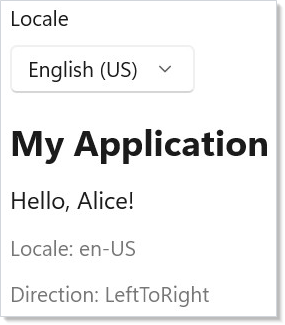
当区域变化时(这里通过 ComboBox),LocaleProvider 会用新的 IntlAccessor 重新渲染其子树。每个调用 UseIntl() 的组件都会自动获得新区域。
消息查找
在任何后代中调用 UseIntl() —— 它是一个 Hook —— 即可拿到 IntlAccessor。用 .Message() 按键查找已翻译的字符串。插值参数以 ("name", value) 元组形式传入 —— 第一项是作为字符串字面量的占位符名(与 .resw 模式中的 {name} 对应),第二项是值。这是元组参数重载支持的紧凑、AOT 安全形态:
class LocalizedContent : Component
{
    public override Element Render()
    {
        var intl = UseIntl();
        var title = intl.Message(new MessageKey("App", "Title"));
        var greeting = intl.Message(
            new MessageKey("App", "Greeting"),
            ("name", "Alice"));

        return VStack(12,
            TextBlock(title).FontSize(24).Bold(),
            TextBlock(greeting).FontSize(16),
            TextBlock($"Locale: {intl.Locale}").Opacity(0.6),
            TextBlock($"Direction: {intl.Direction}").Opacity(0.6)
        );
    }
}
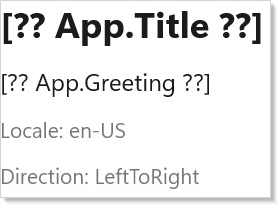
MessageKey 接受一个命名空间与键。命名空间对应你的 .resw 文件名(例如 "App" 对应 App.resw)。该访问器还暴露当前的 Locale、Direction 与 IsRtl 标志。
在以 .resw 为后端的应用里,Reactor.Localization.Generator 在构建时读取默认区域的这些文件,并把同样的键生成为字段(例如 Loc.App.Title)。这些自包含的代码片段会写全 new MessageKey(...),以便内存提供程序依然可见。
格式化数字与日期
IntlAccessor 为数字、日期与列表提供区域感知的格式化。每个方法都返回按当前区域规则格式化后的字符串:
class FormattingDemo : Component
{
    public override Element Render()
    {
        var intl = UseIntl();
        var price = intl.FormatNumber(1234.56,
            new NumberFormatOptions { Style = NumberStyle.Currency });
        var percent = intl.FormatNumber(0.875,
            new NumberFormatOptions { Style = NumberStyle.Percent });
        var date = intl.FormatDate(DateTimeOffset.Now,
            new DateFormatOptions { Style = DateStyle.Long });
        var items = intl.FormatList(
            new[] { "Apples", "Bananas", "Cherries" },
            ListFormatType.Conjunction);

        return VStack(8,
            SubHeading("Formatting"),
            TextBlock($"Price: {price}"),
            TextBlock($"Rate: {percent}"),
            TextBlock($"Date: {date}"),
            TextBlock($"List: {items}")
        ).Padding(24);
    }
}
| 方法 | 选项 |
|---|---|
FormatNumber(value, options?) |
NumberStyle.Default、.Currency、.Percent;小数位控制 |
FormatDate(value, options?) |
DateStyle.Short、.Long、.Full、.Default |
FormatList(values, type) |
ListFormatType.Conjunction("and")或 .Disjunction("or") |
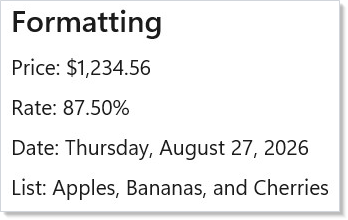
格式化遵循区域的约定 —— 小数分隔符、日期顺序、货币符号与列表连接词都会自动适配。
RTL 检测
用 RtlHelper.IsRtlLocale() 检查某个区域是否从右到左。IntlAccessor 为活动区域暴露 IsRtl 与 Direction:
class RtlDemo : Component
{
    public override Element Render()
    {
        var intl = UseIntl();
        var locales = new[] { "en-US", "fr-FR", "ar-SA", "he-IL", "ja-JP" };

        return VStack(8,
            SubHeading("RTL Detection"),
            VStack(4,
                locales.Select(loc =>
                    HStack(8,
                        TextBlock(loc).Width(60),
                        TextBlock(RtlHelper.IsRtlLocale(loc) ? "RTL" : "LTR")
                            .Bold()
                            .Foreground(RtlHelper.IsRtlLocale(loc)
                                ? Theme.SystemCritical : Theme.SystemSuccess)
                    )
                    .WithKey(loc)
                ).ToArray()
            ),
            When(intl.IsRtl, () =>
                TextBlock("Current layout is right-to-left")
                    .Foreground(Theme.SystemCritical).SemiBold())
        ).Padding(24);
    }
}
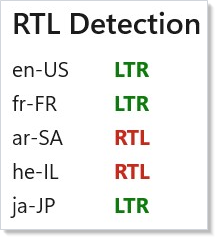
阿拉伯语、希伯来语、波斯语、乌尔都语以及其他若干语言都会被检测为 RTL。用 intl.Direction 在你的布局容器上设置 FlowDirection,让文本与 UI 元素正确流向。
伪本地化
伪本地化把字符替换为带变音符的等价字符并加上填充,以暴露硬编码字符串与截断问题。在 LocaleProvider 上设置 pseudoLocalize: true 即可启用:
class PseudoLocDemo : Component
{
    public override Element Render()
    {
        var (pseudo, setPseudo) = UseState(false);
        var provider = new DemoResourceProvider();

        return VStack(12,
            SubHeading("Pseudo-Localization"),
            ToggleSwitch(pseudo, setPseudo,
                header: "Enable pseudo-localization"),
            LocaleProvider("en-US",
                RenderEachTime(ctx =>
                {
                    var intl = ctx.UseIntl();
                    var title = intl.Message(new MessageKey("App", "Title"));
                    var greeting = intl.Message(
                        new MessageKey("App", "Greeting"),
                        ("name", "World"));
                    return VStack(4,
                        TextBlock(title).FontSize(18).Bold(),
                        TextBlock(greeting));
                }),
                resourceProvider: provider,
                pseudoLocalize: pseudo)
        ).Padding(24);
    }
}
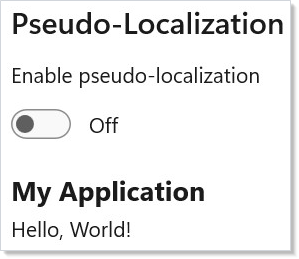
在开发期间运行伪本地化可以尽早抓到问题:没有走 intl.Message() 的字符串会原样显示,因而很容易被发现。被填充的文本则暴露出固定宽度布局中的截断。
提示
始终在根部用 LocaleProvider 包裹。 没有提供程序却调用 UseIntl() 的组件会回退到操作系统区域,但你会失去对区域切换与资源加载的控制。
使用带命名空间的键。 按功能领域组织你的 .resw 文件("Settings"、"Checkout"、"Common"),这样随着应用增长,翻译仍然可控。
尽早用伪本地化测试。 在 debug 构建里打开它。它没有运行时开销,却能抓到那些只在德语或阿拉伯语下才会出现的布局问题。
所有用户可见的数字与日期都要格式化。 永远不要直接调用 .ToString()。FormatNumber 与 FormatDate 会为每种区域处理千位分隔符、小数符号与日期顺序。
对布局敏感的逻辑要检查 intl.IsRtl。 如果你有方向性图标(箭头、尖括号)或绝对定位,请在区域为 RTL 时翻转它们。