实践范例:主从视图
Microsoft.UI.Reactor(Reactor)中的主从视图是最经典的多窗格形态:一侧是记录列表,
另一侧是所选记录的详情。整个结构就是为所选 id 准备的一个 UseState,
加上 HStack 中的两个槽位。
原语
| 槽位 | API |
|---|---|
| 选择状态 | UseState<int?> |
| 列表渲染 | VStack + 键控的 Select(...).ToArray() |
| 选中高亮 | 逐行 .Background(...) |
| 详情分支 | 为 null 情形准备 Element 类型的局部变量 |
| 布局切分 | HStack(0, list, detail) |
record Note(int Id, string Title, string Body);

class NoteBrowser : Component
{
    private static readonly Note[] Notes = new[] {
        new Note(1, "Project plan", "Draft the milestone sequence; ship before Friday."),
        new Note(2, "Grocery list", "Bread, olive oil, lemons, parsley, two limes."),
        new Note(3, "Bug triage",   "Refocus on the persistence regression; defer the WinForms host."),
    };
数据层就是普通的 C#。真实应用会从
IDataSource<T> 或
async-resources 数据源拉取笔记;形态保持不变。
选择状态
// Single source of truth for "which note is selected" — the list
// writes to it via the button click; the detail pane reads from it.
// Re-renders are scoped to slots that actually changed.
var (selectedId, setSelectedId) = UseState<int?>(1);
var selected = Notes.FirstOrDefault(n => n.Id == selectedId);
一个 UseState<int?> 持有 id;列表通过按钮点击写入,
详情通过 FirstOrDefault 读取。只有选择真正变化时,两个槽位才会
重渲染。
布局
var list = VStack(2,
    Notes.Select(n =>
        Button(n.Title, () => setSelectedId(n.Id))
            .WithKey(n.Id.ToString())
            .AutomationName(n.Title)
            .HAlign(Microsoft.UI.Xaml.HorizontalAlignment.Stretch)
            .Background(n.Id == selectedId ? Theme.SubtleFill : Theme.SolidBackground)
    ).ToArray()
).Width(200).Padding(8);

Element detail = selected is null
    ? TextBlock("No selection").Opacity(0.6).Padding(20)
    : VStack(8,
        Heading(selected.Title),
        TextBlock(selected.Body).Opacity(0.8)
    ).Padding(20);

return HStack(0, list, detail);
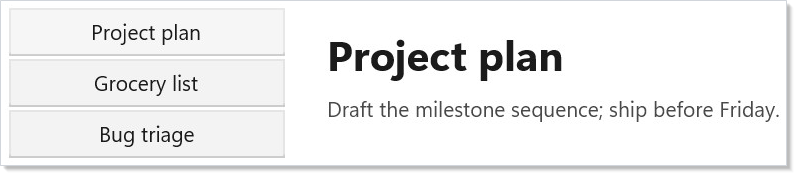
列表是一个由全宽按钮组成的键控 VStack;被选中的那一行获得
与众不同的背景。详情窗格是条件式的 —— selected is null 时
渲染空状态,否则渲染标题 + 正文。两侧都是普通元素;
不需要中间组件。
提示
只有当第三个组件需要选择状态时,才把它提升到上下文中。 同一个 Render 中的列表与
详情窗格通过局部变量共享选择 —— 在第三个窗格(工具栏、状态栏)想要读写之前,
并不需要 UseContext。
把所选记录预先解析一次。 短列表用 FirstOrDefault 就够了;
对于大型目录,请把记录放进 Dictionary<int, Note>,让查找变成 O(1)。
三行数据不要动用 ListView<T>。 完整的集合控件要到 50 行以上才值回票价。
在范例这种规模下,用按钮组成的 VStack 就够,而且读起来毫不费力。