打包¶
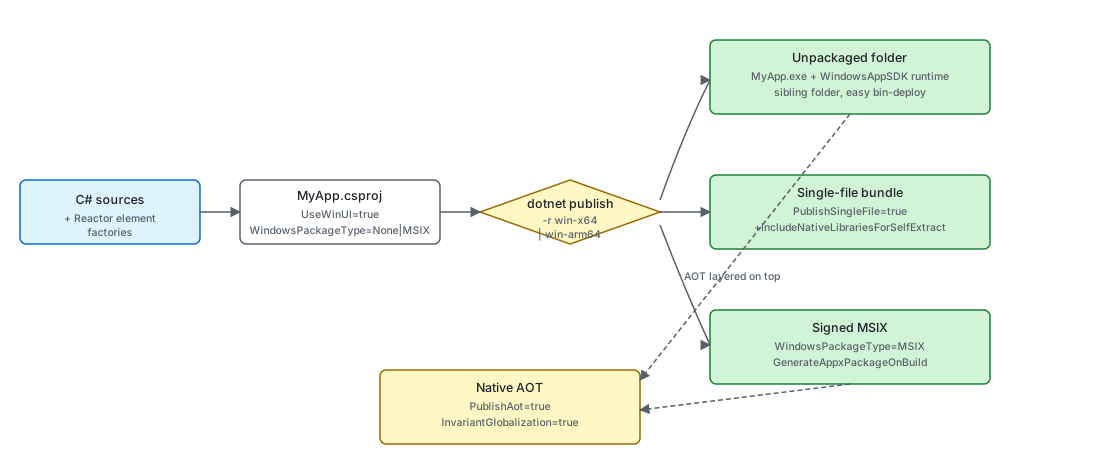
Microsoft.UI.Reactor(Reactor)应用就是一个普通的 WinUI 3 / Windows App SDK 可执行文件 ——
dotnet publish 产出可部署的成品,框架本身在项目文件里
不添加任何奇特的东西。你在发布时选择的是那个成品的形态:
未打包的文件夹
(dotnet new reactorapp 的默认形态)、已签名的
MSIX、单文件捆绑包,或 Native AOT 原生二进制 —— 各与
win-x64 或 win-arm64 运行时标识符组合。这些
取舍与任何 WinUI 3 应用面对的相同;本页中
Reactor 特有的说明覆盖了当你的代码库依赖框架中反射驱动的部分
(AutoColumns<T>、启用 Reactor.DevtoolsSupport 时的
开发工具组件发现,以及 UseObservableTree
的 INPC 遍历器)时会发生什么变化。
| 发布形态 | 关键属性 | 运行时标识符 | 你会得到什么 |
|---|---|---|---|
| 未打包(模板默认) | WindowsPackageType=None、WindowsAppSDKSelfContained=true |
win-x64 / win-arm64 |
一个文件夹,里面有 MyApp.exe 与其旁的 WinUI 3 运行时。可从任意位置运行;打包成 zip 分发。 |
| MSIX | WindowsPackageType=MSIX、GenerateAppxPackageOnBuild=true,通过 PackageCertificateThumbprint 或 PackageCertificateKeyFile 签名 |
win-x64 / win-arm64 |
已签名的 .msix。Microsoft Store 必需;面向企业最干净的旁加载方案。 |
| 单文件 | PublishSingleFile=true、IncludeNativeLibrariesForSelfExtract=true |
win-x64 / win-arm64(必须设置) |
一个 .exe,首次启动时把 WinUI 运行时自解压到 %TEMP%/.net/。 |
| Native AOT | PublishAot=true、InvariantGlobalization=true(推荐) |
win-x64 / win-arm64(必需) |
没有 JIT、没有 Assembly.GetTypes()、没有 Reflection.Emit 的原生二进制。冷启动最快;仅裁剪。 |
这四种形态并不互斥 —— MSIX 可以包住三种发布产物中的任意一种, 而 AOT 可以叠加在未打包文件夹或 MSIX 之上。决策通常 先看分发渠道(Store/旁加载/直接下载),再看性能。
未打包形态¶
dotnet new reactorapp 脚手架出一个未打包的 WinUI 3 项目 ——
本仓库所有示例也用这个形态:
<PropertyGroup>
  <OutputType>WinExe</OutputType>
  <TargetFramework>net10.0-windows10.0.22621.0</TargetFramework>
  <Platforms>x64;ARM64</Platforms>
  <ImplicitUsings>enable</ImplicitUsings>
  <Nullable>enable</Nullable>
  <UseWinUI>true</UseWinUI>
  <WindowsPackageType>None</WindowsPackageType>
</PropertyGroup>
承重的属性是 UseWinUI=true(引入 WinUI 3
XAML 运行时)、WindowsPackageType=None(没有 MSIX 包装 ——
MyApp.exe 直接从发布文件夹运行),以及显式的
<Platforms>x64;ARM64</Platforms>(Windows App SDK 自包含
构建会拒绝 AnyCPU 默认值 —— 模板把 x64 排在前面,好让
不带限定词的 dotnet build 在 x64 开发机上选中正确的默认值,
ARM64 排在第二以支持 Snapdragon X)。
Microsoft.WindowsAppSDK.WinUI
子包带来 WinUI 3 SDK —— 引用程序集加上 MSBuild
build/props/targets —— 而原生 WinUI 运行时由
机器级的 Windows App Runtime 安装提供(或在
WindowsAppSDKSelfContained=true 时捆绑进发布产物)。
消费方从 Microsoft.UI.Reactor 传递得到的就是这个子包;
脚手架模板在生成时又在上面加了完整的
Microsoft.WindowsAppSDK
元包(见下文),因为自包含形态需要该元包携带的 Runtime
可再发行组件。在本仓库内部,正确的引用由 Directory.Build.targets
集中注入,并由 Directory.Build.props 中的
WindowsAppSDKWinUIVersion / WindowsAppSDKVersion 定版。
WindowsAppSDKSelfContained=true 是另一个承重部分 ——
它把 WinUI 运行时捆绑到发布的 exe 旁,使应用无需单独安装
Windows App Runtime 即可运行,并且让
dotnet watch run 能在热重载重建后存活(Reactor 的 Visual
Studio 内嵌预览扩展,以及任何其他基于 dotnet watch 的
内循环工具都依赖这一点 —— 否则增量重建会把传递引用的
Microsoft.WindowsAppSDK.* 重复计数,从而触发
Microsoft.WindowsAppSDK.ComponentReference.targets 的严格
版本检查)。只有当你明确选择了
依赖框架的分发形态、并且安装说明要求用户先安装 WinAppRuntime 时,
才把它翻成 false。
要发布这个形态,执行 dotnet publish -c Release -r win-x64。发布
文件夹包含 MyApp.exe、Reactor.dll、WinUI 运行时
(Microsoft.WindowsAppRuntime.Bootstrap.dll、XAML 编译器
输出 MyApp.xbf 等),以及 .NET 运行时(若
WindowsAppSDKSelfContained=true)。把它压成 zip,你就得到了一个可旁加载的
构建,能在任何架构匹配的 Windows 10 1809+ 机器上运行。
MSIX¶
面向 Microsoft Store 分发与大多数企业旁加载场景, 把同一份发布产物包进 MSIX。单项目 MSIX 形态在未打包的 CSPROJ 之上添加三个属性:
<PropertyGroup>
  <WindowsPackageType>MSIX</WindowsPackageType>
  <GenerateAppxPackageOnBuild>true</GenerateAppxPackageOnBuild>
  <AppxPackageSigningEnabled>true</AppxPackageSigningEnabled>
  <PackageCertificateThumbprint>...</PackageCertificateThumbprint>
</PropertyGroup>

<ItemGroup>
  <AppxManifest Include="Package.appxmanifest" />
</ItemGroup>
Package.appxmanifest 声明包身份(Publisher、
PackageFamilyName、能力、文件类型关联)。
WinUI 3 打包文档
完整覆盖了清单面。签名证书可以是 Microsoft Store 签发的证书(用于 Store 提交),
也可以是导入到 Cert:\CurrentUser\My 的自签名证书(用于
旁加载)。MSIX 是唯一能给应用包身份的形态 ——
后台任务、共享目标和通知器 API 这类功能都需要它。
单文件发布¶
单文件把发布文件夹收拢成一个启动时自解压的 .exe。
对于 WinUI 3 应用,原生运行时部件不在托管程序集里,因此光有
PublishSingleFile=true 仍会在二进制旁留下若干 DLL —— 加上
IncludeNativeLibrariesForSelfExtract 把它们折进捆绑包:
<PropertyGroup>
  <PublishSingleFile>true</PublishSingleFile>
  <SelfContained>true</SelfContained>
  <IncludeNativeLibrariesForSelfExtract>true</IncludeNativeLibrariesForSelfExtract>
  <RuntimeIdentifier>win-x64</RuntimeIdentifier>
</PropertyGroup>
代价是首次启动的延迟 —— 运行时会在进程启动前把
内嵌程序集解压到 %TEMP%\.net\(或
DOTNET_BUNDLE_EXTRACT_BASE_DIR 指定的目录)。两条
Reactor 特有的说明:在单文件捆绑包内 Assembly.Location 返回空字符串,
因此任何在 exe 旁拼路径的代码都应改用
AppContext.BaseDirectory;
以及
UsePersisted 的 Application 作用域写入
%LOCALAPPDATA%\<AssemblyName>\ —— 单文件不会改变该
位置,但裁剪掉程序集名(例如在发布配置里改
<AssemblyName>)会改变它。
ARM64¶
ARM64 是同一个项目上的第二个运行时标识符 —— 项目模板中的
<Platforms>x64;ARM64</Platforms> 这一行
存在的目的,是让 MSBuild 接受按平台的还原。在 CI 中
跑两次 publish 即可同时构建两者:
ARM64 并没有单独的 Reactor 构建 —— Reactor.dll 是
等效于 AnyCPU 的托管代码,同一份源码可为两种架构编译。
它下面的原生部件(WinUI 3 运行时,
以及 Reactor 传递引入的任何 System.Drawing.Common / TraceEvent 原生库)
按 RID 分发,这就是为什么即使 Reactor 代码是纯托管的,
运行时标识符依然重要。本仓库的
示例应用默认使用 <Platforms>x64;ARM64</Platforms>;
reactorapp 模板使用 <Platforms>x64;ARM64;X86</Platforms>
(保留 X86 是为了与 WinUI 3 模板保持一致),但 Reactor
自身只在 x64 / ARM64 上测试。
Native AOT¶
Reactor 的性能基准项目以 AOT 发布并能干净运行 ——
框架的热路径就是按 AOT 兼容来构建的。其
形态与任何其他 AOT 发布相同,使用 PublishAot=true
加一个运行时标识符:
<PropertyGroup>
  <OutputType>WinExe</OutputType>
  <TargetFramework>net10.0-windows10.0.22621.0</TargetFramework>
  <Platforms>x64;ARM64</Platforms>
  <RootNamespace>StressPerf.Reactor</RootNamespace>
  <AssemblyName>StressPerf.Reactor</AssemblyName>
  <ImplicitUsings>enable</ImplicitUsings>
  <Nullable>enable</Nullable>
  <UseWinUI>true</UseWinUI>
  <WindowsPackageType>None</WindowsPackageType>
  <PublishAot>true</PublishAot>
</PropertyGroup>
dotnet publish -c Release -r win-x64 产出一个原生二进制 ——
没有 coreclr.dll、没有 JIT,在同一台硬件上冷启动约 50 毫秒,
而基于 JIT 的构建约 250 毫秒。项目模板把
同样的形态放在一个 NativeAot 参数之后:
<PropertyGroup>
    <OutputType>WinExe</OutputType>
    <TargetFramework Condition="'$(TargetFrameworkOverride)' == ''">net10.0-windows10.0.22621.0</TargetFramework>
    <TargetFramework Condition="'$(TargetFrameworkOverride)' != ''">TargetFrameworkOverride-windows10.0.22621.0</TargetFramework>
    <!--
        x64 first so an unqualified `dotnet build` / F5 picks the right default on the
        majority of dev machines. ARM64 second for Snapdragon X. X86 retained for parity
        with the WinUI 3 templates even though Reactor itself is only tested on x64 / ARM64.
    -->
    <Platforms>x64;ARM64;X86</Platforms>
    <UseWinUI>true</UseWinUI>
    <WindowsPackageType>None</WindowsPackageType>
    <!--
        WindowsAppSDKSelfContained bundles the Windows App SDK runtime alongside the
        published exe so the app:
          (a) runs from any folder without a separate Windows App Runtime install, and
          (b) survives `dotnet watch run` hot reload (used by the Reactor Visual Studio
              embedded-preview extension — spec 056). Incremental rebuilds otherwise
              double-count transitive Microsoft.WindowsAppSDK.* references and trip
              Microsoft.WindowsAppSDK.ComponentReference.targets' strict version check
              ("version 2.0.20;2.0.20 was referenced"). Self-contained bundling
              sidesteps that check.
        Tradeoff: ~30 MB extra in the publish output. To ship framework-dependent
        (smaller publish, requires the user to install Microsoft.WindowsAppRuntime
        separately) flip this to false and ensure your install instructions tell users
        to install the runtime first.
    -->
    <WindowsAppSDKSelfContained>true</WindowsAppSDKSelfContained>
    <TargetPlatformMinVersion>10.0.17763.0</TargetPlatformMinVersion>
    <SupportedOSPlatformVersion>10.0.17763.0</SupportedOSPlatformVersion>
    <Nullable>enable</Nullable>
    <!--
        Embeds the app icon in the .exe so File Explorer and shortcuts show it.
        The ReactorApp.Run(icon:) call in App.cs sets the *window* icon (taskbar /
        Alt-Tab / Task Manager); without either, Reactor falls back to
        Assets\AppIcon.ico and then to this embedded icon.
    -->
    <ApplicationIcon>Assets\AppIcon.ico</ApplicationIcon>
    <!--
        Auto-resolve RuntimeIdentifier from the host SDK when the caller hasn't pinned
        Platform / RuntimeIdentifier explicitly. Lets `dotnet build` / `dotnet run`
        succeed without forcing -p:Platform=x64 on every invocation — WindowsAppSDK's
        self-contained build path requires a concrete RID.
    -->
    <RuntimeIdentifier Condition="'$(RuntimeIdentifier)' == '' And ('$(Platform)' == '' Or '$(Platform)' == 'AnyCPU' Or '$(Platform)' == 'Any CPU')">$(NETCoreSdkPortableRuntimeIdentifier)</RuntimeIdentifier>
    <!--#if (NativeAot) -->
    <PublishAot>true</PublishAot>
    <InvariantGlobalization>true</InvariantGlobalization>
    <!--#endif -->
</PropertyGroup>
传入 dotnet new reactorapp --NativeAot true 即可得到启用 AOT 的
变体。InvariantGlobalization=true 与 PublishAot
配对使用,因为另一种做法 —— 分发完整的 ICU 数据 —— 会引入
AOT 分析器标记为可操作的裁剪警告。
注意:
AutoColumns<T>与Assembly.GetTypes()是两处需要了解的反射 面。Factories.AutoColumns<T>()会遍历typeof(T).GetProperties()来为DataGrid<T>构建FieldDescriptor,因此该泛型实参带有[DynamicallyAccessedMembers(PublicProperties | PublicConstructors)]—— 从你的组件中调用它,AOT 分析器会把该标注 穿透回你的代码。手工构建的Column<T>(...)列完全避开反射,对裁剪敏感度高的代码来说 是安全的选择。开发工具的代码路径会遍历Assembly.GetTypes()来枚举 组件类型(当应用选择Reactor.DevtoolsSupport时),这与裁剪 不兼容,并在每个触及它的方法上都带有[RequiresUnreferencedCode]。 零售版/AOT 构建请保持该开关关闭(这是有据可依的零售形态,见 开发工具)。
提示¶
先定分发渠道,再定性能。 MSIX 基本是 Store 专用, 并给你真正的包身份;未打包 + zip 是最简单的 直接下载方案;单文件与未打包形态相同,只是首次启动更慢。 AOT 与这三者都独立 —— 分发形态定下来之后再应用它。
从第一天起就在 CI 中为两种架构发布。 Snapdragon X 上的
ARM64 Windows 如今已是真实受众;仅 x64 的构建
能在模拟下运行,但要付出启动代价。模板中的 <Platforms> 行
以 x64 打头(开发机的多数默认值)并包含 ARM64 ——
缺的那一块是构建流水线里第二次
dotnet publish -r win-arm64 调用。
让 Reactor.DevtoolsSupport 留在零售版之外。
Reactor.DevtoolsSupport 这个运行时宿主配置
选项是一个能力门,运行时没有任何用户可见的东西依赖它 ——
但它启用的代码路径会遍历 Assembly.GetTypes()。
在 Release/AOT 构建中保持关闭,就能去掉开发工具的裁剪警告,
并让链接器移除该路径。开发工具的实现类型随可选的、同版本的
Microsoft.UI.Reactor.Devtools 包分发;只把该包加到
刻意暴露 --devtools 的应用项目里。
只有真正用到时才引用 Microsoft.UI.Reactor.Advanced。 这个可选的、同版本的
Microsoft.UI.Reactor.Advanced 包承载
较重的可选子系统(spec 062 §7):Win2D 画布族
(Win2DCanvas、Win2DAnimatedCanvas、Win2DVirtualCanvas)、
数据网格(DataGrid / Column / AutoColumns)、Markdown
渲染器(Markdown(...))、图表子系统(Charts + D3
原语),以及停靠子系统(DockManager)。其中任何一项的消费方
都必须加上它的 <PackageReference>。加上它还会把
Microsoft.Graphics.Win2D(约 1 MB 托管 + 约 3 MB 原生互操作 dll)拉进
你的发布产物,并为 AOT 裁剪器把它的 WinRT 激活链
标记为根,因此不使用任何 Advanced 子系统的应用应让
Microsoft.UI.Reactor.Advanced 不出现在自己的 <PackageReference> 列表中 —— 这样就能
把那些被搬出的子系统与 Win2D 原生负载都挡在你的
构建之外。这一拆分正是 Advanced 作为兄弟包而不是
Reactor.dll 内一个文件夹的全部原因。
Reactor.dll 作为托管程序集出现在你的发布产物中,
而不是被藏在某个框架包里。 Reactor 以公开预览
NuGet 包 Microsoft.UI.Reactor 版本 0.1.0-preview.15 分发;本地
源码构建的冒烟包仍通过 mur pack-local 使用 0.0.0-local。
对裁剪友好的部署不会得到任何框架侧魔法;适用于任何 WinUI 3 应用的
同一套裁剪器配置,在这里同样适用。
Microsoft.WindowsAppSDK 由模板在生成时添加,
而不是钉在签入的 CSPROJ 里。 模板文件本身只带有
Microsoft.UI.Reactor;随后一个 dotnet new 后置动作会执行
等价于 dotnet add package Microsoft.WindowsAppSDK 的操作,因此刚刚
脚手架出来的项目拿到的是最新稳定版 SDK,而不是在模板发布时
冻结的版本。两个引用随后并排出现在你的 CSPROJ 中,
SDK 版本因此始终是一个显而易见的旋钮 ——
需要特定 WinUI 补丁时就在那里改。如果你不用模板、
手工引用 Microsoft.UI.Reactor,SDK 仍会作为
Microsoft.WindowsAppSDK.WinUI 传递到达;当你想要 WindowsAppSDKSelfContained=true 或
MSIX(两者都需要 Runtime 可再发行组件)时,请自行加上完整的
元包。仓库内部的
WindowsAppSDKVersion MSBuild 属性只管辖本克隆下的项目
(Directory.Build.props);消费方项目直接选择自己的版本。
脚手架模板的 Debug 构建会自动包含
Microsoft.UI.Reactor.Devtools 包(由一个
Condition="'$(Configuration)' == 'Debug'" 的 ItemGroup 把关,它同时添加
该包与 RuntimeHostConfigurationOption
Reactor.DevtoolsSupport=true)。脚手架生成的
Properties/launchSettings.json 还带有一个
"<AppName> Devtools" 配置,它会传 --devtools;在
Visual Studio 或 VS Code 中选中它(默认配置不传任何参数),
就能点亮右键开发工具菜单与停靠的开发工具窗口。
Reactor 的 Visual
Studio 内嵌预览扩展(spec 056)也依赖这套
Debug 接线 —— 它通过 dotnet watch run -- --devtools run --embed
--embed-host-pid <pid> 激活,需要在用户进程中可加载
开发工具程序集。那个 VSIX 目前是这套接线最粗糙、最
实验性的消费方;除非你在刻意测试内嵌
预览,否则请保留「仅 Debug」的边界。Release 构建会同时丢弃该包
与宿主配置开关,让裁剪/AOT 分析器保持安静;
如果你也想在 Release 中启用开发工具,把该 ItemGroup 移出
Debug 条件即可。